PPPoE (Point-to-Point Protocol over Ethernet)
What is Network?
Network
What is Network?
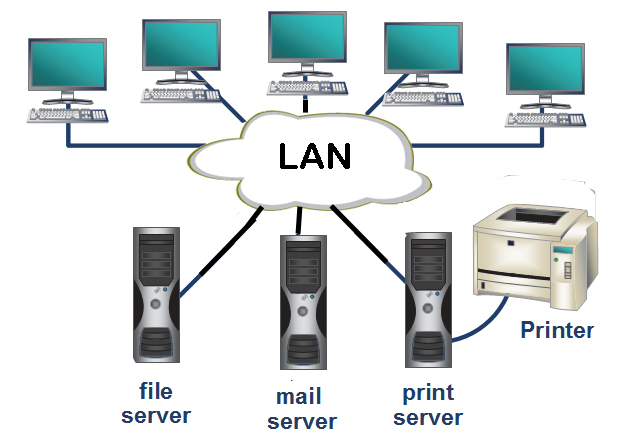
A network consists of two or more computers that are linked in order to share resources (such as printers and CDs), exchange files, or allow electronic communications. The computers on a network may be linked through cables, telephone lines, radio waves, satellites, or infrared light beams.
Two very common types of networks include:
- Local Area Network (LAN)
- Wide Area Network (WAN)
You may also see references to a Metropolitan Area Networks (MAN), a wireless LAN (WLAN), or a wireless WAN (WWAN).
Local Area Network
A Local Area Network (LAN) is a network that is confined to a relatively small area. It is generally limited to a geographic area such as a writing lab, school, or building.
Wide Area Network
Wide Area Networks (WANs) connect networks in larger geographic areas, such as Florida, the United States, or the world. Dedicated transoceanic cabling or satellite uplinks may be used to connect this type of global network.
How to activate Windows?
Copy this text
Watch Full Video To Activate your Windows
HDMI vs DisplayPort vs DVI vs VGA
Difference between HDMI, VGA, DVI, DisplayPort
HDMI
It’s important to note that while you shouldn’t go spending big bucks on HDMI cables since most are the same, different cables have different speed ratings. You’ll need a high speed (category 2) cable for resolutions above 1080i. Fortunately for most people, high-speed cables created for HDMI 1.4 will meet the specifications of HDMI 2.0. Some cables have support for HDMI with Ethernet, but very few devices actually make use of this feature. To recap, there are four kinds of HDMI cables: the high speed with Ethernet, high speed without Ethernet, the standard speed with Ethernet, and standard speed without Ethernet. An expensive high-speed cable will not improve the picture over a $2.50 high-speed cable. This leads us to HDMI. Created by a group of electronics manufacturers, the HDMI standard is a set of guidelines for creating high-bandwidth connections between digital devices. With the right setup, HDMI can make a significant difference in a home-theater system. The current standard can carry 1080p high-definition signals, and it supports eight channels of uncompressed audio, enough for a 7.1 surround-sound system. HDMI can cut down on the number of cables required to connect components, and it can even reduce the number of remote controls needed to watch a movie.
VGA
A Video Graphics Array (VGA) connector is a three-row 15-pin DE-15 connector. The 15-pin VGA connector was provided on many video cards, computer monitors, laptop computers, projectors, and high definition television sets. On laptop computers or other small devices, a mini-VGA port was sometimes used in place of the full-sized VGA connector.Stands for "Video Graphics Array." It is the standard monitor or display interface used in most PCs. Therefore, if a monitor is VGA-compatible, it should work with most new computers. The VGA standard was originally developed by IBM in 1987 and allowed for a display resolution of 640x480 pixels. Since then, many revisions of the standard have been introduced. The most common is Super VGA (SVGA), which allows for resolutions greater than 640x480, such as 800x600 or 1024x768. A standard VGA connection has 15 pins and is shaped like a trapezoid.
A VGA Extender is an electronic device that increases the signal strength from a VGA port, most often from a computer. They are often used in schools, businesses, and homes when multiple monitors are being run off one VGA port, or if the cable between the monitor and the computer will be excessively long (often pictures appear blurry or have minor artifacts if the cable runs too far without a booster). VGA extenders are sometimes called VGA boosters.
Newer video cards often do not have a VGA output. The DVI-I output, which still contains an analog VGA-compatible signal, is often also omitted. Therefore, if the user intends to connect a monitor or projector that features only a VGA input, the user usually will need to facilitate the use of an active converter that receives the digital signal from a DVI-D or HDMI or DisplayPort connector and changes it into analog suitable for VGA. Only older series of video cards and motherboards (for use with an integrated GPU) may still have a VGA or DVI-I connector available.
DVI
DisplayPort
How To Create a Ping Script in Python || Python Ping Script | Citi Solution
How To Create a Ping Script in Python || Python Ping Script | Citi Solution Youtube Video Source Code import os ipaddr = "google.com...
-
How to Clear Terminal History in Kali Linux | clear_history open ~/.zshrc add the following line alias clear_history='echo ""...
-
PPPoE (Point-to-Point Protocol over Ethernet) PPPoE (Point-to-Point Protocol over Ethernet) is a specification for connecting multiple compu...
-
Introduction Computers have made great inroads in our everyday life and thinking. They are put to use for all sorts of applications ranging ...